Did you ever wonder why do you have to write code like:
public ActionResult SomeAction()
{
  ...
  return View("SomeView", model);
}
instead of this beauty:
public ActionResult SomeAction()
{
...
  return Views.Home.SomeAction(model);
}
Note the advantages:
- Path to view is strong typed. No more “SomeView”.
- model argument is strong typed as well. No more passing a wrong typed only to discover the error at runtime.
- You can’t pass a non-performing argument anymore. This happens when you pass a view name and that view isn’t stored where MVC expects it to be: in a default folder (with the same name as controller under Views folder). Instead MVC will search for the view using various file-system locations and thus loosing valuable time. Lesson learned from Whiletrue's ASP.NET MVC presentation at SLODUG.
Sounds good? If yes, read further.
Instructions
There is a single requirment: you’ll need (my preferred) template based code generator CodeSmith.
1. Create a root folder named CodeSmith in your ASP.NET MVC project.
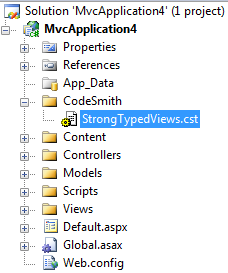
2. Unzip the attached CodeSmith template named StrongTypedViews.cst and put it into the folder mentioned above. Include it into the project. The project should look like this:
3. Right click on CodeSmith folder and add a CodeSmith Project item next to the StrongTypedViews.cst item. Name it CodeSmith.csp.
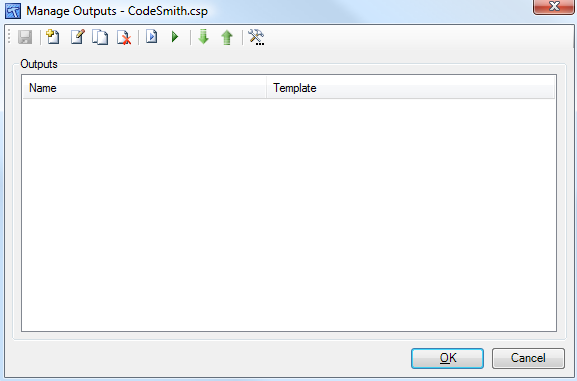
4. Right click on CodeSmith.csp and select Manage Outputs entry. You should see a modal window like this:
5. Click Add Output button (first enabled one from the left).
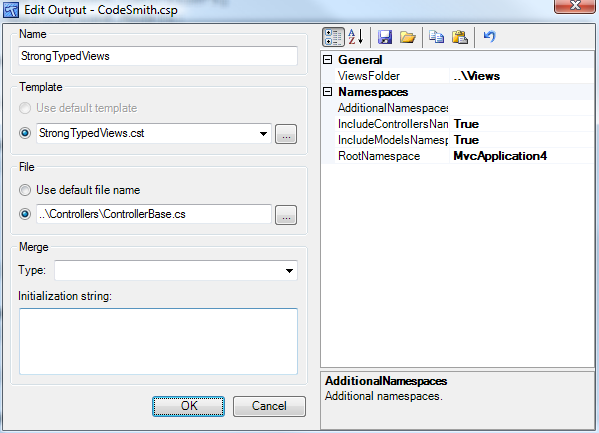
6. Type in StrongTypedViews.cst in the text field of the Template group (or click […] button next to it and select StrongTypedViews.cst). Name field should be auto populated with the same name.
7. In the File group select the radio button near text box and type in ..\Controllers\ControllerBase.cs (or do the same using […] button).
8. Finally, type in the root namespace of your project, MvcApplication4 in my case, into the RootNamespace property on the right side. The complete entry should look like this:
9. Click OK and another OK. At this point Visual Studio might warn you that a file has been modified outside the source editor. That’s fine as the previous steps did actually modify CodeSmith.csp file. Click Yes to reload it.
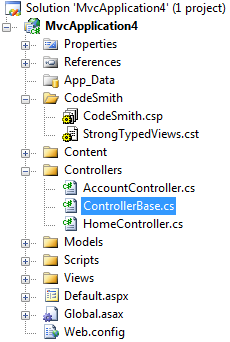
10. Generate the strong typed views by right clicking CodeSmith.csp and selecting Generate Outputs. You should see a new file names ControllerBase.cs under Controllers folder, like this:
11. One final step remains. Derive your controllers from auto generated ControllBase class and that’s it. You are now free to use strong typed views. You’ll find them by calling Views property and the with the same structure as it appears in the solution explorer.
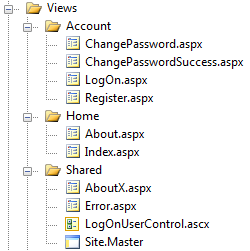
i.e. if you want to return Index view you would use syntax like:
return Views.Home.Index();
or you can pass it a model, through an overload of the Index() method. Note that the model argument is strong typed (or object if the type isn’t specified in the aspx file). The syntax is same for both “full” and partial views (remember, they are strong typed and they know what to return) – no need to call either View or PartialView method.
12. If your views do change and they will you’ll have to recreate ControllerBase.cs class. This is really simple. Save all the view files and re-run Generate Outputs on the CodeSmith.csp project (as in step 10.). You can also set code generation on each build if you prefer.
That’s it.
Implementation details
Read this chapter if you are interested in inner working of this approach.
There are three distinct parts of the generated code.
ControllerBase class
You are required to derive your controllers from ControllerBase class for a simple reason – it provides Views property which is a gateway to all the views. The other (internal) feature of ControllerBase is to provide access to both View() and PartialView() methods to generated code (they are protected internal).
The Views property returns a new instance of ViewFolder auto generated class. Code is pretty much self-explanatory and looks like this:
public partial class ControllerBase: Controller
{
...
  public new ViewResult View(string path, object model)
{
    return base.View(path, model);
}
  public new PartialViewResult PartialView(string path, object model)
{
    return base.PartialView(path, model);
}
  protected ViewsFolder Views
{ get { return new ViewsFolder(this); } }
...
}
ViewFolderBase class
This class is implemented within ControllerBase class and servers as a base class to the classes generated for each folder
public class ViewFolderBase
{
  protected readonly ControllerBase controllerBase;
  public ViewFolderBase(ControllerBase controllerBase)
{ this.controllerBase = controllerBase; }
}
Its main purpose is to “transport” the ControllerBase reference from one class to the another. This transportation is required because the reference to ControllerBase is required by the final class in the chain to call either View or PartialView method.
Classes generated for each folder under Views folder
Each such class (ViewFolderBase derived) is named by the folder it represents and a “Folder” suffix. It represents a single folder in the Views folder structure in the solution. These classes are declared within ControllerBase to reduce their scope. They have a two set of properties:
- Views properties where there are two overloaded methods for each view in that folder. One overload is without arguments and the other contains a single strong typed model argument (which might be an object when the model is not typed in the view).
i.e. Error view from Shared folder. Note the strong typed model argument in the second overload. Note also the full path to the aspx file.
	public ViewResult Error()
	{ return controllerBase.View("~/Views/Shared/Error.aspx");
public ViewResult Error(System.Web.Mvc.HandleErrorInfo model) { return controllerBase.View("~/Views/Shared/Error.aspx", model); }
- Subfolder properties which represents subfolders of that particular folder. The purpose is to allow chaining.
i.e. ViewFolder’s (representing Views folder) subfolders section:
	public AccountFolder Account
	{ get { return new AccountFolder(controllerBase); } }
public HomeFolder Home { get { return new HomeFolder(controllerBase); } }public SharedFolder Shared { get { return new SharedFolder(controllerBase); } }
Template properties
Besides the RootNamespace property mentioned in the step 8 of the instructions there are other properties.
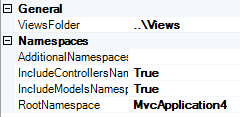
- ViewsFolder: relative path to the Views folder in the solution
- AdditionalNamespace: namespaces you want to place (using statement) in the generated ControllerBase.cs class. This is useful because model type is just copied from the declaration in the view files. So if you don’t use fully qualified types then you should put those namespaces in this property.
- IncludeControllersNamespace: includes the namespace (a shortcut to the putting this namespace into AdditionalNamespaces)
- IncludeModelsNamespace: includes the namespace (a shortcut to the putting this namespace into AdditionalNamespaces)
- RootNamespace: the root namespace of your project. It will be used to compose a namespace where ControllerBase will reside (.Controllers suffix is automatically added).
Performance considerations
The generated code should perform very well. On the positive side it forces full path to the view files so the file is found at runtime in first attempt. On the negative side there is some overhead because the chaining creates few classes and passes a reference to ControllerBase instance to them. It shouldn’t be a huge overhead, or better, I didn’t even notice it in my simple performance tests (10.000 times calling each page using single core).
- using View(“About”): ~658 requests/s
- using View(“AboutX”): ~580requests/s (it searches the Home folder first and Shared folder next where it finds AboutX.aspx)
- using Views.Home.About(): ~658 requests/s
Tests were simple but I am pretty much confident in the results. Note the performance drop in the second case when MVC does file searching. All in all the overhead is pretty non existing. And it is non existing if you take into considerations all the benefits.
But if you want full performance without overhead there is a way. Instead of chaining used one might opt for method name composition which would result in:
return Views_Home_About();
for the About view. This way there wouldn’t be any overhead at all. I prefer my approach but that’s subjective.
Final words
Being a “strong typed” developer I find this approach a good one from every perspective. It should reduce errors if not improve performances as well. And all this for free – no manual typing required.
In the open source spirit of the ASP.NET MVC I am giving the template for free. Use it as you wish. Let me know if you have made improvements though – I’d be interested in seeing them and perhaps incorporating them.
Comming next: strong typed routes.
StrongTypedViews.zip (2.02 kb)