You should have heard from experienced developers that you shouldn't abuse try/catch to handle a situation that is predictable and easily handled with an if statement. Even guys at [MS] preach this approach.
Take a look at this piece of code:
string fileName = "somefile.xml";
bool notFound;
try
{
  FileStream fs = File.Open(fileName, FileMode.Open);
  // do something
}
catch (FileNotFoundException)
{
  notFound = true;
}
While this method produces correct output (notFound=true) when file isn't found there are at least two problems in there:
- Method is slower when file isn't found (because of throwing exception overhead). This is just a small overhead.
- What's more annoying is that if you have Debugger/Exceptions... settings set to intercept all exceptions (shown in picture below) you will catch such exceptions even when there is nothing wrong with the code.
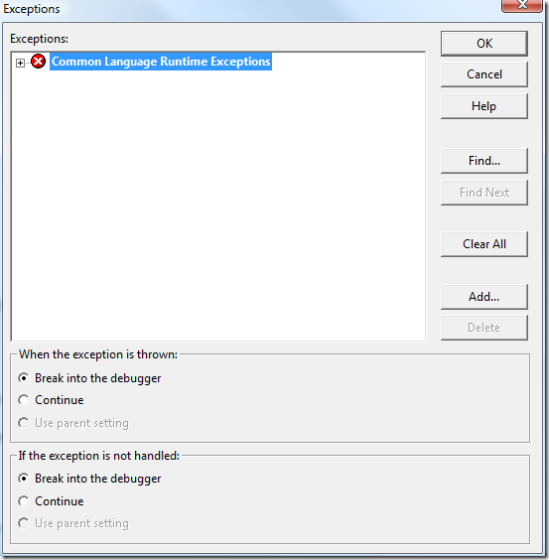
The reason why I am writting this post is that I get such an exception when creating an instance of IsolatedStorageFileStream class. Visual Studio correctly stopped on instance creation telling me that an exception of type FileNotFoundException occured.At first I was a bit puzzled why would I get FileNotFoundException when I was passing FileMode.Create flag. Doesn't make sense, right? Wrong. IsolatedStorageFileStream constructor internally implements similar (not same) code described above. It uses a handled exception for checking whether file exists even when using FileMode.Create!
Instead the code above could be rewritten as:
string fileName = "somefile.xml";
bool notFound;
if (File.Exists(fileName)
{
  FileStream fs = File.Open(fileName, FileMode.Open);
  // do something
}
else
  notFound = true;
This approach is more elegant, readable, faster and it doesn't throw anything on predictable problems. I guess [MS] guys could clean up a bit .net library.
UPDATE (gorazd pointed that there is a possibility that file disappears between File.Exists and File.Open - while I thought of this when I was writing this post I forgot to include it in the code). So, here is an improved v2:
string fileName = "somefile.xml";
bool notFound;
if (File.Exists(fileName))
{
  try
  {
    FileStream fs = File.Open(fileName, FileMode.Open);
    // do something
  }
  catch (FileNotFoundException)
  {
    notFound = true;
  }
}
else
  notFound = true;
UPDATE: The good news is this behavior is a must only in Visual Studio 2003. Not because of a code change. No, there is actually an option to disable catching non-my-code exceptions. The option is turned on by default. So, here it is: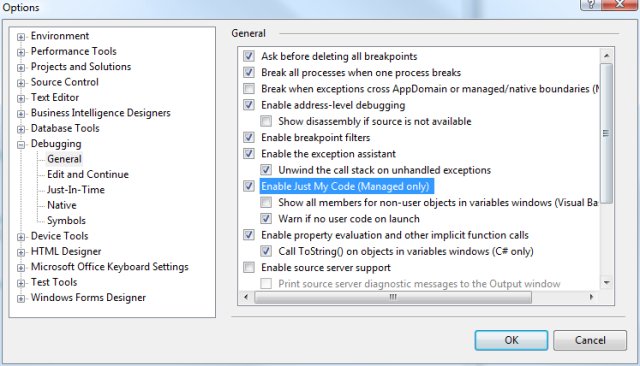
You'll find it in Tools/Options... Unfortunatelly that doesn't help if you are stuck in a Visual Studio 2003 world.